App Shell Module
← App map · The three-column split view (feeds · timeline · article), launch, and deep links from widgets, notifications and the feed:/netnewswire: URL schemes.
Screenshots scroll sideways · tap to enlarge
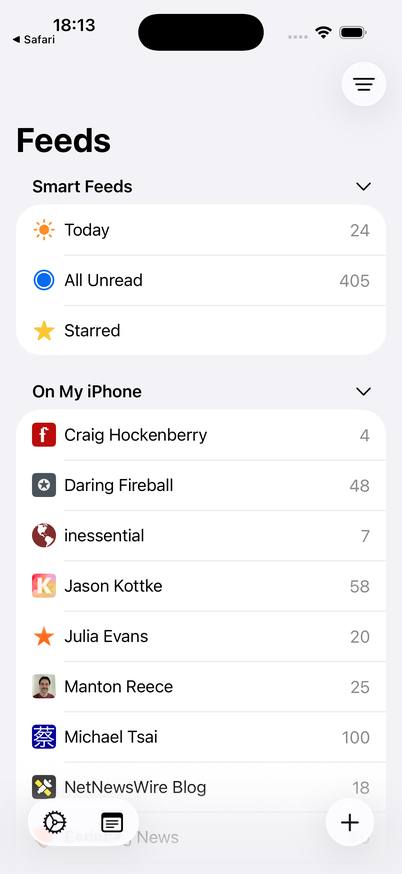 On iPhone the three columns are one navigation stack, opening on the feeds
What it does
AppDelegate starts AccountManager before anything else, registers background refresh tasks and notification handling, and imports the default feeds on first run. Each window scene gets its own SceneDelegate, which builds one SceneCoordinator and hands it the RootSplitViewController — a UISplitViewController with three columns: the feed sidebar (primary), the article timeline (supplementary) and the reading view (secondary). On iPhone the columns collapse into a single navigation stack instead. A cold launch restores the previous selection unless an external action — a notification tap, a Home Screen quick action, a Siri shortcut, a widget tap, or a feed:/feeds:/netnewswire://theme URL — is pending, in which case that action's navigation wins and selection restoration is skipped so the two don't race. Widget taps for the Today, Starred and Unread smart feeds open that feed and, after a fixed 0.6 s to let the sidebar rebuild, select the specific article by ID.
Logic class diagram
SceneCoordinator is the one object every screen talks to: it owns the three visible view controllers and the sidebar's tree, and is the only thing that knows how to navigate between them.
One split view, three columns; the coordinator decides which columns show at once from the current displayMode.
Open an article from a Home Screen widget sequence
A widget tap always carries the smart feed's URL plus the article's ID as a query item.
Key files
iOS/AppDelegate.swift · app launch, background refresh, notificationsiOS/SceneDelegate.swift · per-window scene, deep-link URL handlingiOS/SceneCoordinator.swift · navigation, selection, search, sidebar state (~2,800 lines)iOS/RootSplitViewController.swift · the 3-column UISplitViewController