Interests Module
← App map · Every topic you can follow, alphabetically, with a follow toggle; tapping one opens its Topic detail.
Screenshots scroll sideways · tap to enlarge
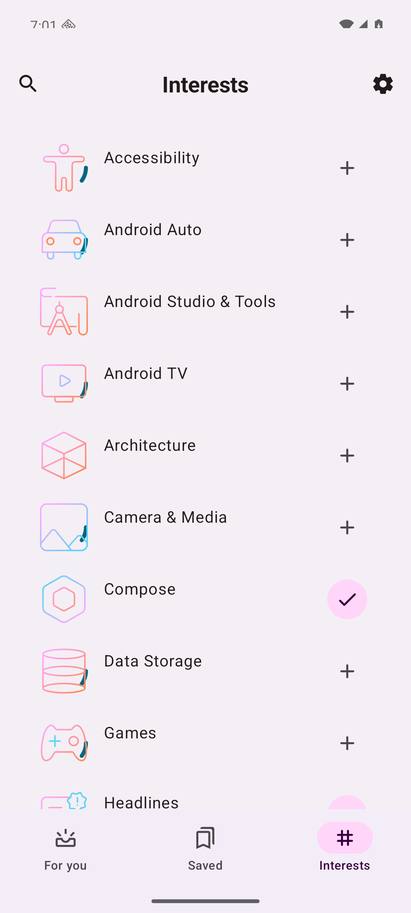 Every topic, with a follow toggle
What it does
A single tab lists every topic (GetFollowableTopicsUseCase, sorted by name) with a toggle for whether you follow it; toggling calls setTopicIdFollowed straight through to UserDataRepository, no local state. Tapping a topic name (not the toggle) opens the Topic module. On a wide screen, the Interests list is the list pane of a two-pane layout (ListDetailSceneStrategy) — the Topic module then renders as its detail pane alongside it, and before any topic is picked the detail pane shows InterestsDetailPlaceholder, a plain "pick a topic" card, instead of being empty. On a narrow screen there's no detail pane: tapping a topic pushes it onto the current tab's back stack instead.
Logic class diagram
The selected topic id (only meaningful for the two-pane layout) rides in SavedStateHandle alongside the nav key's own initialTopicId.
TabContent is the same list row builder the Topic module reuses for "topics you might also follow."
- ◆── contains
- ──▷ reads model
Follow a topic, then open it sequence
Key files
feature/interests/impl/.../InterestsScreen.kt · the topic list, list-detail wiringfeature/interests/impl/.../InterestsViewModel.kt · InterestsUiState, follow/select actionsfeature/interests/impl/.../TabContent.kt · the shared topic-row list, reused by Topicfeature/interests/impl/.../InterestsDetailPlaceholder.kt · the wide-screen empty detail panefeature/interests/impl/.../navigation/InterestsEntryProvider.kt · the list-pane nav wiringfeature/interests/api/.../navigation/InterestsNavKey.kt · the top-level nav key