Screenshots scroll sideways · tap to enlarge
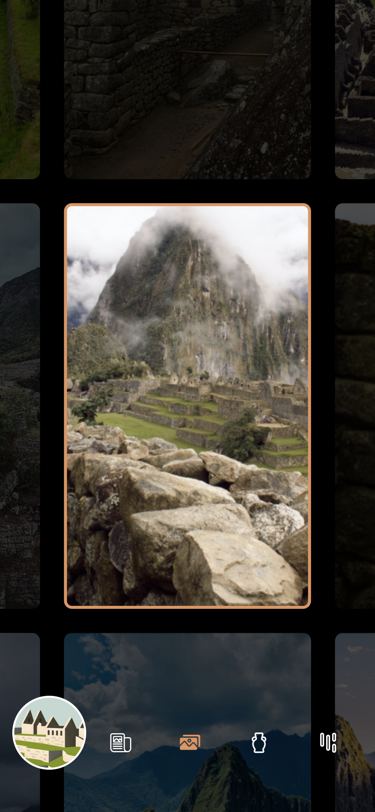 The swipe grid with the cut-out photo
What it does
The wonder’s Unsplash collection id picks one of 8 bundled lists of 24 photo ids (UnsplashPhotoData.photosByCollectionId); the list is repeated and cut to fill 25 cells, and each photo loads from wonderous.info at 400, 800 or 1200 px (doubled on 1.5× screens and desktop) — the live Unsplash API in UnsplashService is only used by dev tools. The grid starts on index 13 (12.5 rounds up, one cell right of centre). A swipe of 30 px in any of 8 directions or an arrow key moves one cell or row (never past an edge), and tapping a visible neighbour selects it; the whole grid slides there in 240 ms while the selected photo scales to 1.15 and a 70 % black overlay keeps a rounded cut-out around it that briefly shrinks 25 % along the swipe axis. Tapping the selected photo opens FullscreenUrlImgViewer with all 25 at 1200 px (pinch to zoom, swipe between them); closing it returns the page you ended on and the grid jumps there without animating. One corner cell, chosen per wonder, hides the wonder’s second collectible until it is found.
Logic class diagram
Everything is index arithmetic on a fixed grid: swipes, keys and taps become a new index, and the offset that centres it is computed, not scrolled.
- ──▷ holds
- ◇── list of
- ┄┄▷ uses
- ──▷| extends
A grid bigger than the screen, translated so the selected cell sits in the middle, under a black overlay with a cut-out.
- ◆── contains
- ──▷ reads model
- ┄┄▷ builds
Swipe across the wall and open a photo sequence
A swipe is snapped to one of 8 directions, turned into an index, and the grid animates to that index’s offset.
Key files
lib/ui/screens/photo_gallery/photo_gallery.dart · grid, index math, tapslib/ui/screens/photo_gallery/widgets/_animated_cutout_overlay.dart · overlay with cut-outlib/ui/common/controls/eight_way_swipe_detector.dart · 8-direction swipeslib/ui/common/modals/fullscreen_url_img_viewer.dart · full-screen photo pagerlib/logic/unsplash_logic.dart · photo ids per collectionlib/logic/data/unsplash_photo_data.dart · bundled ids, image URLs